Live chat for Bubble.io
Add live chat to your Bubble app
Human Reply is a Bubble plugin that puts a live chat bubble on every page of your app. Every chat lands in your team's Telegram group, whoever is free replies from their phone, and the reply shows in your app in seconds.
7-day free trial · Starting $10 a month
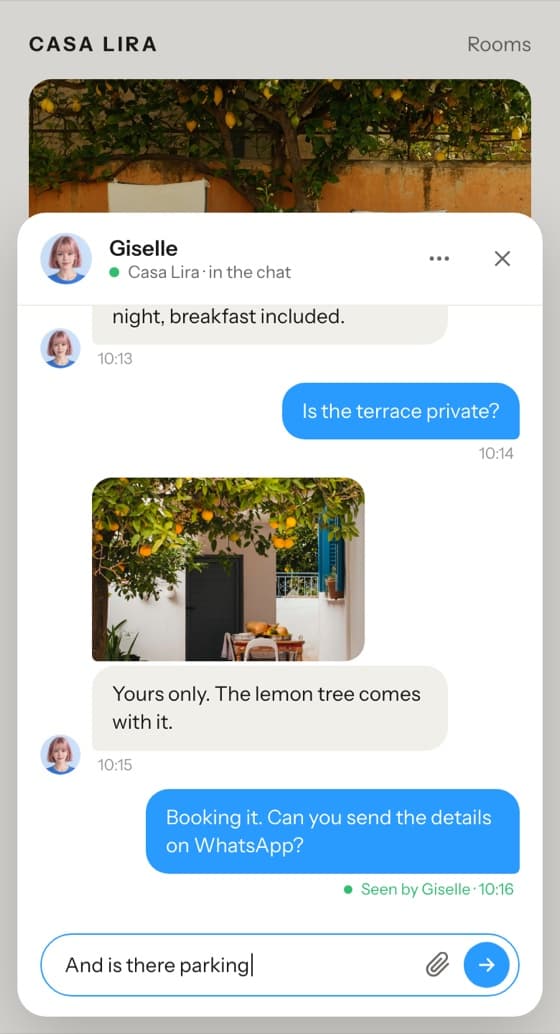
- From the marketplaceHuman Reply Live Chat, free to install
- About ten minutesFive guided steps
- On every pageOne key, pasted once
- The whole teamNo seats, one price per app
Made for Bubble
Human Reply Live Chat is a plugin in Bubble's marketplace. Install it, paste the key setup gives you, and the chat is on every page of your app.
See it on a real Bubble app: open the demo.
- On every page. It loads with every page of your app and stays open as people move around, in the colour you pick.
- Nothing to place. No element to drag onto a page and no workflow to build. One key in the plugin's settings.
- On the free plan too. There the chat runs in your app's test version, so you can try it before you deploy.

Set up in about ten minutes
Choose Bubble at humanreply.app and type your app's address, then five guided steps in your browser. The last one gives you the key for the plugin.
- 1Create the botIn BotFather, with the first message typed for you.
- 2Add it to a group with TopicsThe page checks as you go.
- 3Send a test leadWrite from the setup page, then claim it from your phone.
- 4Set your hoursBusiness hours, auto-away and the ways to reply.
- 5Make your accountYour email, then your card on Stripe. 7-day free trial.
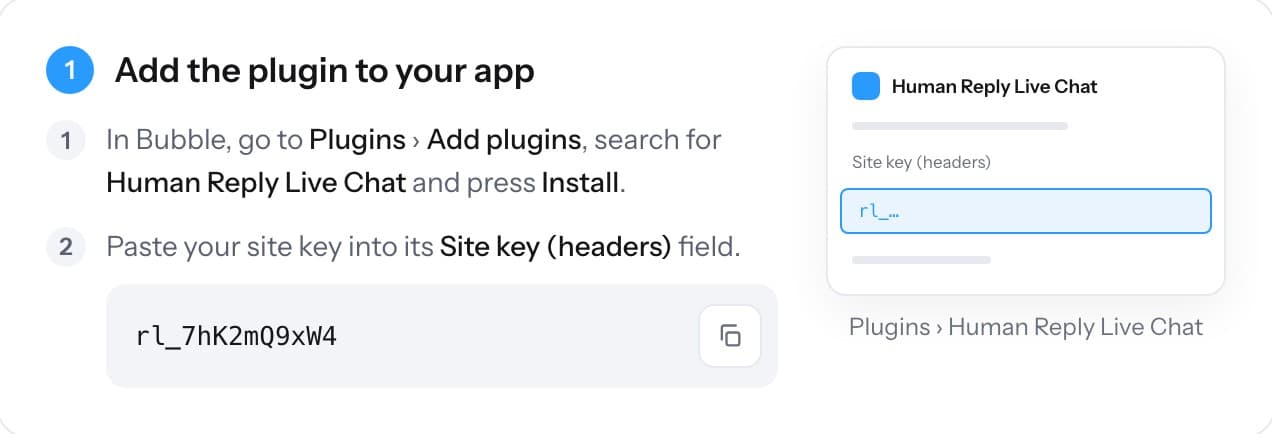
Every step, with what to press in Bubble, is in the Bubble setup guide.
It looks like your app
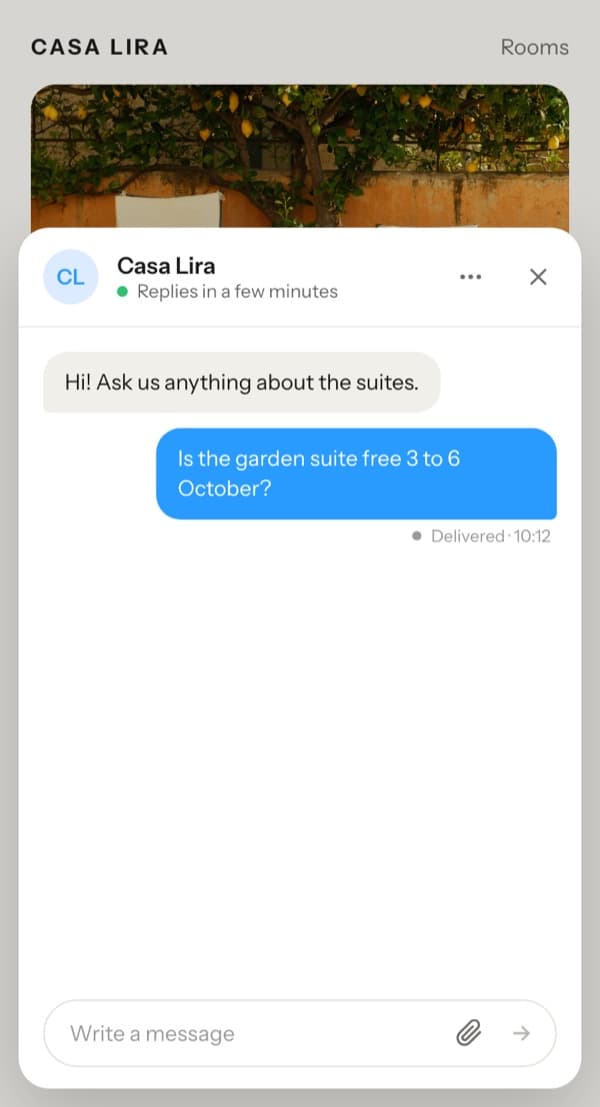
The bubble takes your app's font and your colour, in light or dark, so it reads as part of your page.
- Name and logo. They start as your app's name and icon. Change either.
- Language. It speaks your app's language and every word can be customised.
- Either corner. Bottom right or bottom left, clear of Bubble's badge on the free plan.
- Phones. On a phone the chat opens full screen.
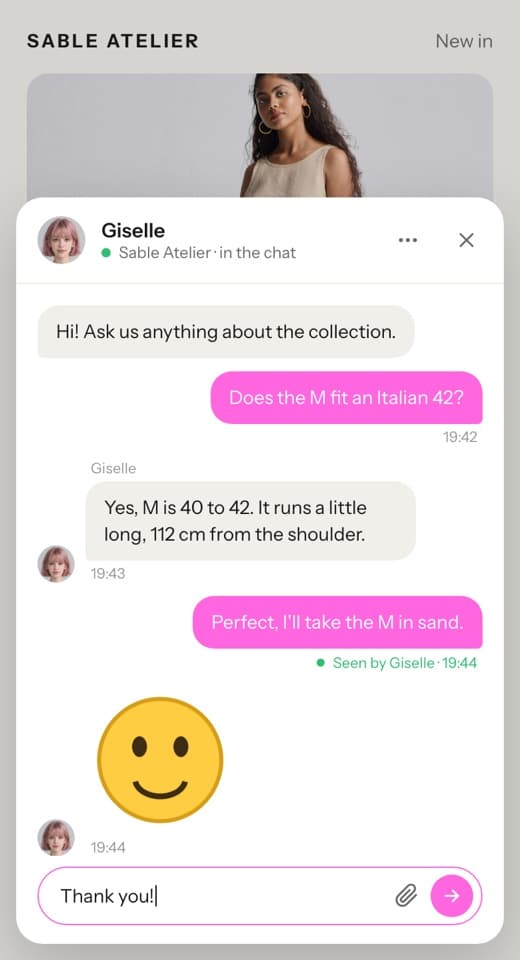
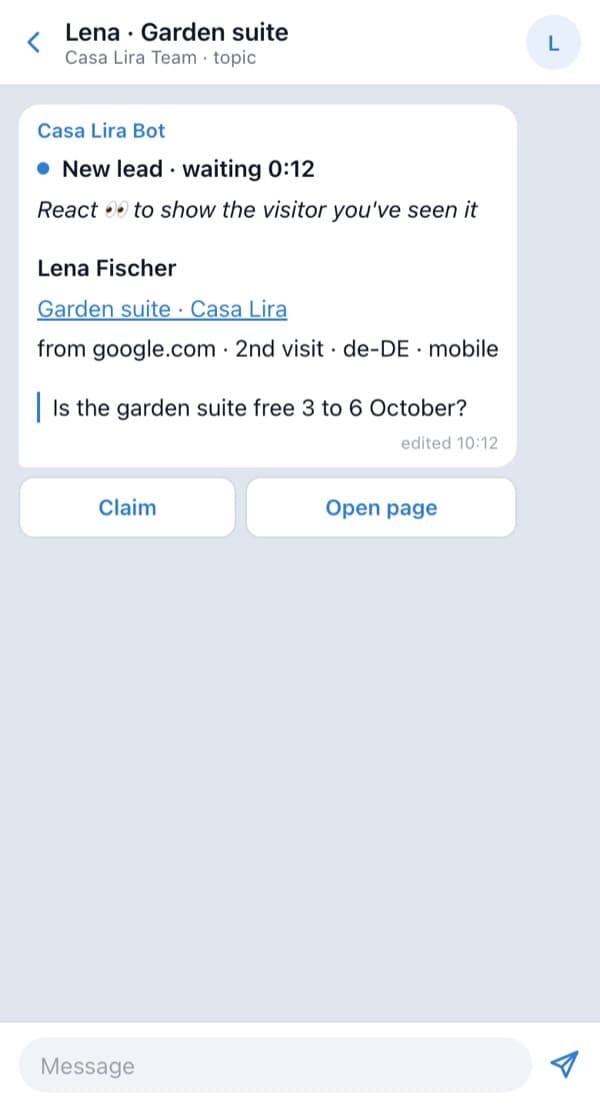
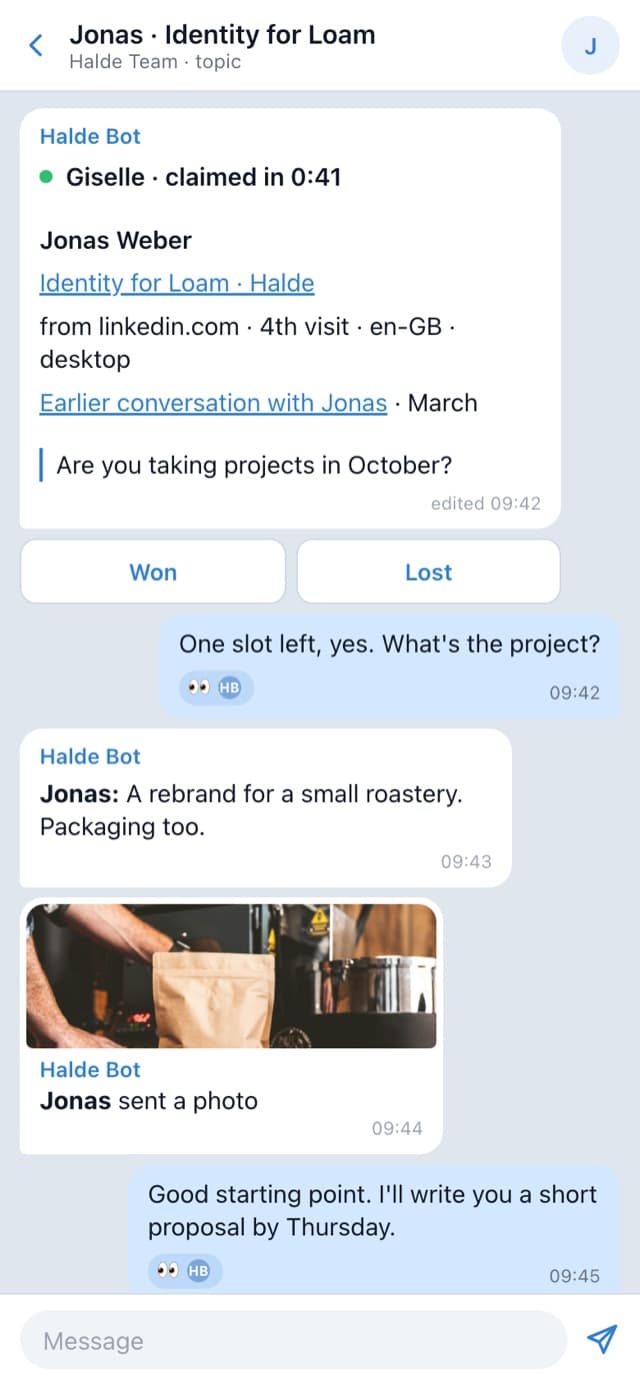
Each chat gets its own topic in your team's Telegram
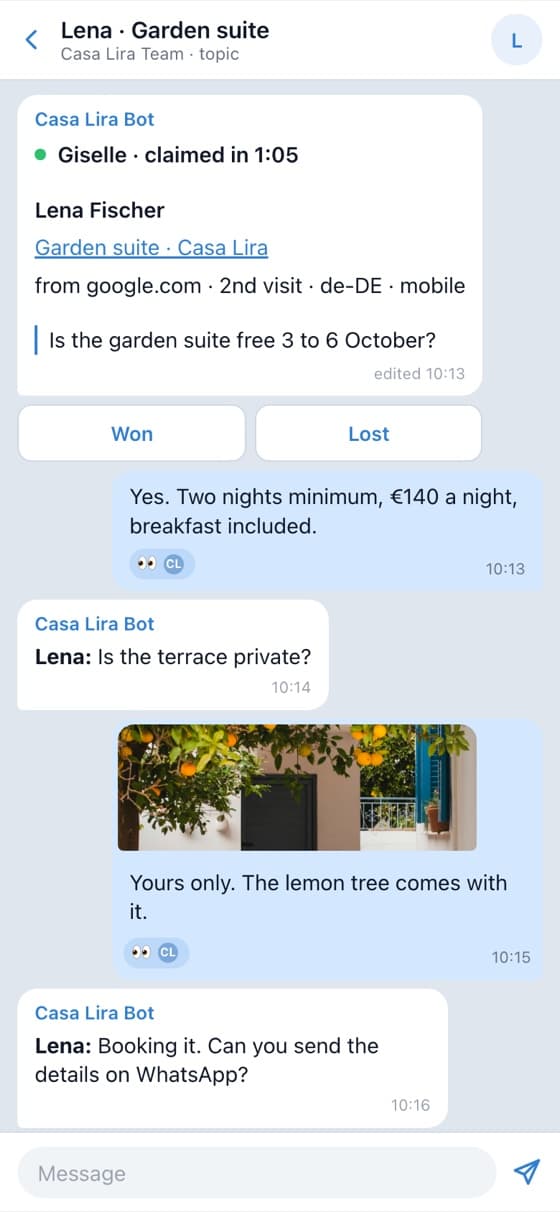
Every chat opens a topic in your team's Telegram group, with a lead card on top, so everyone sees it and one person picks it up.
- The lead card. The page and item they were looking at, where they came from, how often they've visited, and any earlier chat.
- Claim, Won, Lost. Tap Claim, or just reply, and the chat is yours. Won or Lost closes it.
- Read receipts, both ways. React to their message and they see "Seen by" and your name. You see when they've read your reply.
The whole loop, step by step, is on the homepage.
Your dashboard on humanreply.app
Who is at the desk, every conversation, and how the bubble looks and what it says. Changes reach your app at once, with nothing to deploy.
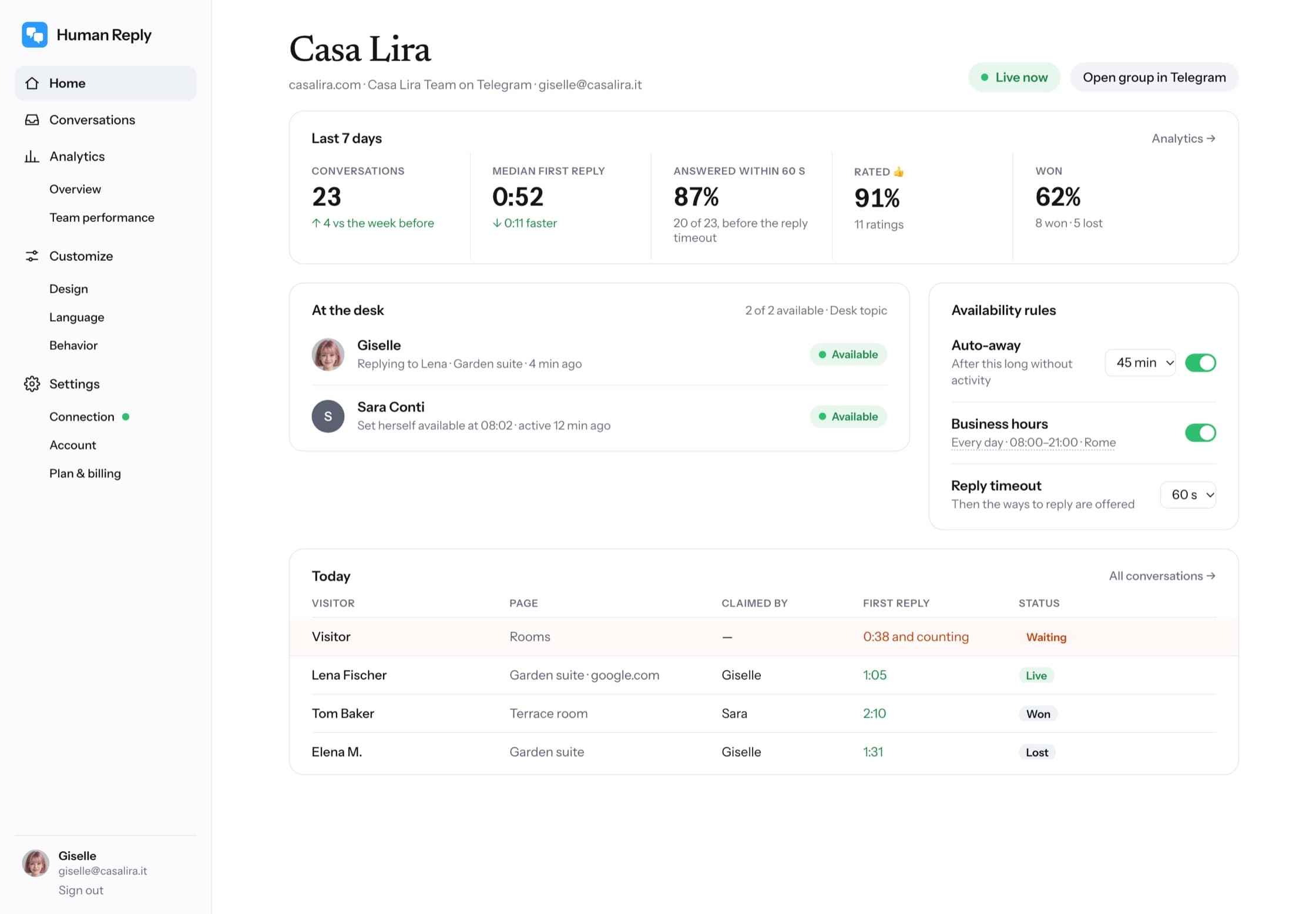
- HomeThe week in numbers, who is at the desk, and today's chats.
- AnalyticsConversations, first reply and thumbs up, by page and by person.
- CustomizeHow the bubble looks, what it says and how it behaves.
- ConnectionTurns green once the bubble has been seen in your app.
When nobody is free
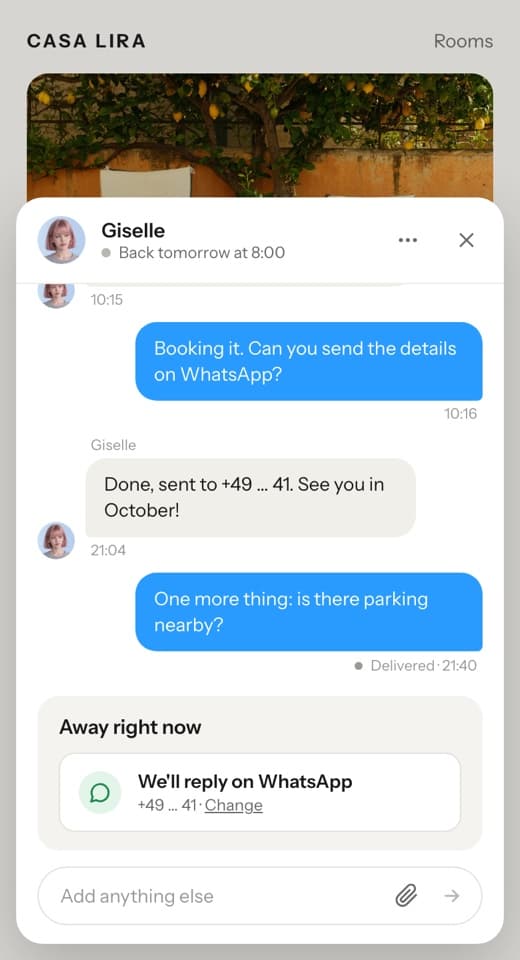
When nobody is free, the bubble says so and asks the visitor where the reply should go.
- The ways to reply. WhatsApp, Telegram, email, Instagram or Messenger, whichever you switch on. Your team writes to them from its own account.
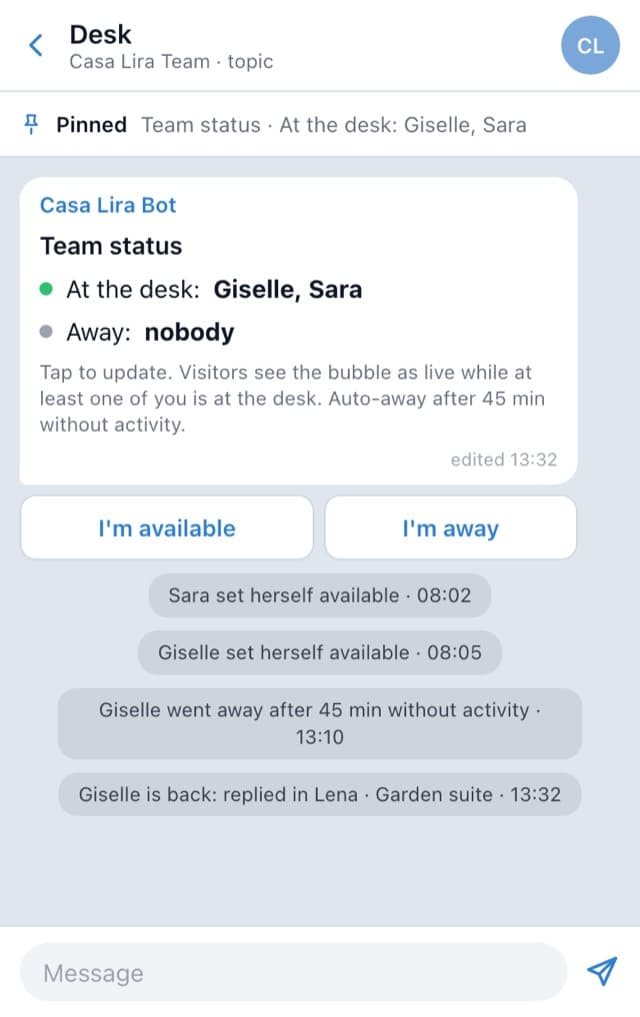
- Hours and auto-away. Set your business hours, and tap I'm available or I'm away in Telegram. Anyone quiet for 45 minutes is marked away.
A person writes every reply. The greeting and the away note are words your team sets.
For agencies building client apps
Install the plugin in each client's app, and every app gets its own bot and Telegram group.
- The client's team answersThey reply from their phones in Telegram and never need to open the Bubble editor.
- Their chats onlyNobody sees another client's chats.
- Priced per appOne plan for each client app, whatever the size of its team.
A plugin, a pasted script, or a messenger button
There are three ways to put chat on a Bubble app.
| Compared | Human Reply | A pasted script | A messenger button |
|---|---|---|---|
| How it's added | The plugin puts it on every page, with one key | A vendor's script pasted into Settings › SEO and metatags1 | A plugin element you place on a page2 |
| Where the conversation happens | In your app, both ways, files included | In your app | In WhatsApp, off your app2 |
| Where the team answers | Your team's Telegram group, a topic per chat | The vendor's own inbox and apps | The WhatsApp number the button opens |
| What you pay for | The app: $12 a month, the whole team included | Often each person who answers | Free2 |
One plan, per app
Human Reply costs $12 a month per app, or $10 a month billed yearly.
- TodayYour free trial starts.
- Three days before it endsWe email you a reminder.
- After seven daysYour plan starts. Cancel before then, from the dashboard, and nothing is charged.
Human Reply for one app
Monthly
$12a monthYearly−17%
$10a month, $120 billed yearly- The whole team, no seats
- Unlimited conversations
- Photos, documents and stickers, both ways
Questions
- How do I install Human Reply?
- Go to humanreply.app/start, choose Bubble and type your app's address: five guided steps give you a site key. Then in Bubble, Plugins › Add plugins, install Human Reply Live Chat and paste the key into Site key (headers).
- Do visitors need Telegram?
- No. They chat in your app. Only your team uses Telegram.
- Do I need a Telegram Business account?
- No. A regular Telegram group with Topics and a bot you make in BotFather. Setup walks you through both.
- Which pages is the bubble on?
- Every page of your app, bottom right or bottom left, as you choose.
- Does it work on Bubble's free plan?
- Yes. The free plan can't deploy to live, so there the chat runs in your app's test version, at yourapp.bubbleapps.io/version-test. On a paid plan, deploy and it is on your live app.
- What about the "Built on Bubble" badge?
- On the free plan, Bubble puts its badge in the bottom right corner. Move the chat to the bottom left in your dashboard, under Customize › Position.
- Does it work with my own domain?
- Yes. The chat works on your bubbleapps.io address and on your own domain alike. Type either one when you set up.
- Does it slow my app down?
- No. The bubble loads after your page and fetches its settings in the background, so your page doesn't wait for it.
- What happens when nobody is free?
- The bubble says so and asks where the reply should go: WhatsApp, Telegram, email, Instagram or Messenger, whichever you switch on. Your team writes to them from its own account.
- How much does it cost?
- $12 a month per app, or $10 a month billed yearly. The first seven days are free, and the plugin itself is free to install.
- Is Human Reply made by Bubble?
- No. Human Reply is made by Hella Fast, LLC, and isn't affiliated with Bubble.
- How do I remove it?
- In Bubble, open Plugins, choose Human Reply Live Chat and press Uninstall this plugin, then deploy. Your conversations stay in your Telegram group. To end the plan, cancel from Plan & billing in the dashboard.
More answers in the homepage FAQ.
Add live chat to your Bubble app
The next chat in your app lands in your team's Telegram.
7-day free trial · Starting $10 a month
Human Reply is not affiliated with Framer, Webflow, WordPress, Squarespace, Lovable, Bubble, Google or Telegram.